How Microsoft Copilot Automates Your Workday
Understanding Artificial Intelligence (AI): A Foundation for Everyone
Artificial intelligence, or AI, has rapidly transformed from a futuristic concept into a practical tool accessible to businesses and individuals in everyday life. In its simplest terms, AI describes computer systems engineered to mimic human learning, reasoning, and creative abilities, allowing them to generate text, analyze complex data, create images, or even converse naturally in multiple languages. The last few years have made AI mainstream—offering powerful digital “assistants” not just for technology experts, but for anyone curious to work more effectively or unleash new creativity at work, at home, or in pursuit of personal projects.
While there are many forms of AI, recent innovations have focused on so-called generative AI—tools that understand prompts, produce new content, and adapt to the needs and preferences of individual users. Large language models (LLMs), like GPT-4 and GPT-5, are at the heart of this evolution, powering familiar tools from ChatGPT to Microsoft Copilot. As we’ll explore, these systems can not only write essays and summaries, but automate repetitive work, analyze business data, produce new designs, and offer personalized recommendations.
However, for many people the prospect of adopting AI can feel intimidating or unclear. This article is written for you—the professionals, business owners, students, and lifelong learners who are ready to dip a toe into AI, but want guidance rooted in real-world, accessible examples. We’ll focus on Microsoft Copilot, highlighting what it is, how it’s evolved, its strengths and practical use cases, and what’s next. Along the way, we’ll show you how Copilot integrates with popular Microsoft products and how you can get started using AI right now.
The Origin and Evolution of Microsoft Copilot
A Timeline from Bing Chat to Today’s Microsoft Copilot
Microsoft’s journey into AI began long before most of today’s end users even saw an AI-powered experience. In 2019, Microsoft entered a strategic partnership with OpenAI, the creators behind GPT (Generative Pretrained Transformer) models. This deep relationship paved the way for Microsoft to uniquely access, adapt, and extend OpenAI’s technology, using its Azure cloud as a supercomputing backbone for building generative AI products.
The beginning of Microsoft Copilot can be traced to early 2023 with the launch of Bing Chat—a new conversational search and chatbot feature for Microsoft Bing and Microsoft Edge, built atop OpenAI’s then-latest LLMs. Microsoft soon recognized the transformative potential of generative AI, and set out to create a unified family of AI experiences, rebranding Bing Chat as Microsoft Copilot in September 2023.
Since then, Microsoft Copilot has experienced rapid innovation and expansion:
- February 2023: Bing Chat launches (AI-powered search assistant).
- March 2023: Microsoft 365 Copilot is announced (AI integration for Microsoft 365 apps).
- September 2023: Microsoft begins unifying all chatbot experiences under the Copilot name, with a new logo and dedicated branding.
- January 2024: Announcement of a new Copilot key on select Windows keyboards, along with expansion plans for Windows 11 integration.
- May 2024 – 2025: Copilot receives major upgrades, including adoption of the state-of-the-art GPT-4o model, a fresh interface, powerful personalization, voice and vision features, and advanced agent capabilities.
- April 2025: Microsoft rolls out highly anticipated features like Copilot Memory (personalized recall), Actions (performing online tasks), and Deep Research mode.
- September 2025: Continual releases for both enterprise and personal users, with expanded integrations, agent features, and new admin controls.
From its origin as a simple conversational assistant, Copilot has grown into a highly capable, modular AI powered by the latest language models from OpenAI, tightly woven into Windows, the web, Microsoft Edge, and the entire suite of Microsoft 365 productivity applications. This rapid progression is a testament to Microsoft’s vision—AI should not be reserved for the tech elite, but should be as commonplace and intuitive as sending an email or opening a document.
Microsoft Copilot Today: Features, Capabilities, and Everyday Integrations
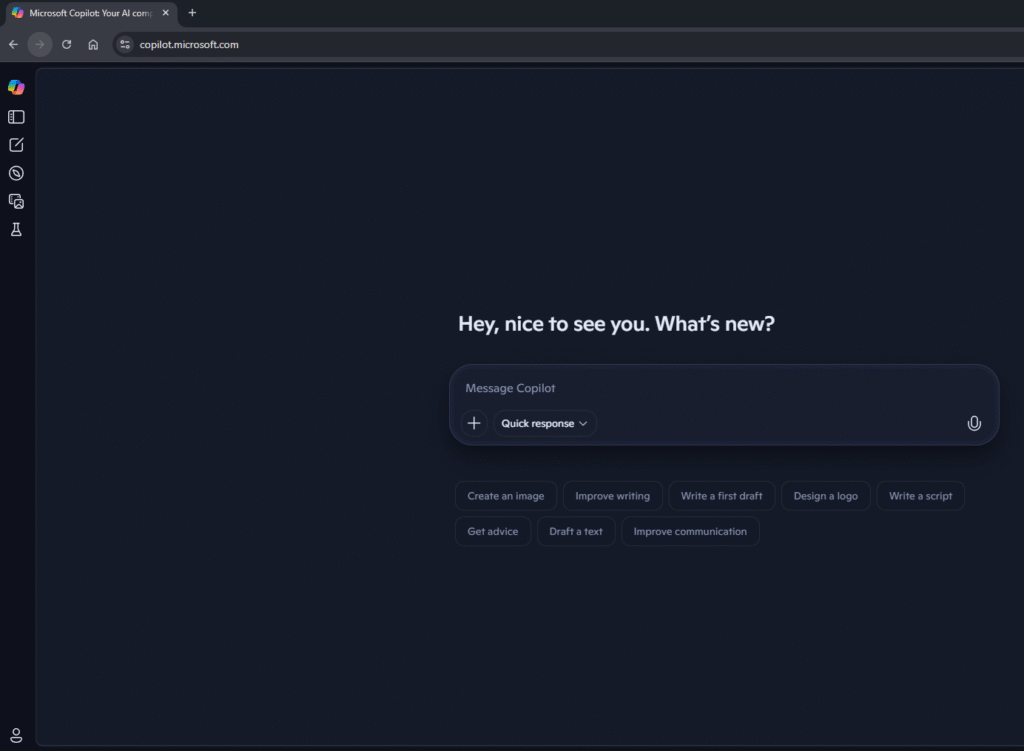
Core Features That Define Copilot in 2025
At its heart, Microsoft Copilot is an AI-powered companion designed to boost productivity, enhance creativity, and streamline digital tasks for every user, not just IT specialists. Powered by advanced foundation models (GPT-4 Turbo, GPT-4o, and now GPT-5 for some subscribers), Copilot is both conversational and contextual, capable of interacting with users through typed prompts or voice. Key features and underlying capabilities include:
- Natural Language Understanding and Generation: Interact conversationally, ask questions, or give detailed instructions in plain English (or another supported language). Copilot responds with human-like clarity—answering complex questions, drafting content, or parsing vast amounts of information.
- Document, Email, and Data Summarization: Summarize lengthy emails, meetings, or entire documents in seconds.
- Content Generation and Rewriting: Draft emails, reports, presentations, code, and even poetry or stories, based on user direction and provided context.
- Data Analysis and Visualization: Instantly generate charts, interpret spreadsheet data, and forecast trends without learning complicated formulas.
- Plugins and Extensibility: Leverage a growing selection of plugins for travel booking, shopping, nutrition, and more, alongside rich third-party ecosystem integration.
- Voice and Vision Interaction: Ask questions or give commands by voice; use Copilot Vision to analyze images, your screen, or the physical world (through your mobile camera).
- Personalization with Memory and Actions: Copilot learns your preferences, can recall previous conversations, and perform online tasks (e.g., making reservations or searching for deals).
- Agent Capabilities and Automation: Advanced users (and IT admins) can build custom “agents” that automate multi-step workflows or answer specialized questions.
Table: Microsoft Copilot Features and Integrations with Microsoft Products
| Feature/Integration | Free Copilot | Copilot Pro | Microsoft 365 Copilot |
| Cost | Free | $20/mo | Subscription Required |
| Mobile App | Yes | Yes | Yes |
| Voice Interaction | Yes | Yes | Yes (in rollout) |
| Microsoft Designer (Image Gen) | Limited | Extensive | Yes |
| Chat | Yes | Yes | Yes |
| Web Applications | Partial | Yes | Yes |
| Desktop Applications | Partial | Yes | Yes |
| Account Required | Microsoft Account | Microsoft Account | Microsoft Entra ID |
| Third Party Integration | Basic plugins | Plugins, GPTs | Extensive (e.g., Salesforce, Jira) |
| Microsoft Graph Integration | No | No | Yes |
| Enterprise Data Protection | No | No | Yes |
| Plugins & Extensibility | Yes | Yes | Yes |
| Admin Controls | Basic | Yes (Pro policies) | Extensive |
This table merely scratches the surface. In the following sections, we’ll explore in depth how Copilot is embedded across Word, Excel, PowerPoint, Teams, Outlook, Dynamics 365, and more, making AI accessible at the very moment and context the user needs it.
Seamless Integration: Copilot in Microsoft 365 Apps and Services
Copilot in Microsoft Word: The End of Writer’s Block
Gone are the days of staring at a blank document. Copilot in Microsoft Word allows users to:
- Draft with Copilot: Start new documents from a simple prompt (e.g., “write a marketing proposal for a new software service”) or use existing outlines, notes, or referenced files as context.
- Transform and Edit: Highlight text to instantly rewrite, summarize, change tone (e.g., from formal to friendly), or visualize content as a table.
- Cite Sources Automatically: When asked to summarize external content, Copilot can include citations for transparency.
- Quick Q&A: Ask Copilot specific questions about the document or request additional research right inside the document pane.
- Audio Summaries and Read-Back: Listen to an audio summary or podcast-style discussion of your document, allowing quick catch-up on the go.
Real-World Example: A user can ask Copilot to rewrite a section of a proposal in a more persuasive voice and then add a table comparing two options. When running short on time, they ask Copilot to summarize the three key takeaways and generate a short executive summary, complete with references to the most relevant sources.
Copilot in Microsoft Excel: Data Analysis for All
Manual number crunching and intimidating formulas are a thing of the past with Copilot in Excel. Copilot can:
- Suggest and Generate Formulas: Type a plain-English request (e.g., “show me which region had the highest sales in Q2”), and Copilot writes and inserts the appropriate formulas and summaries.
- Visualize Data Instantly: Create charts, pivot tables, and dynamic reports based on user direction.
- Analyze and Forecast: Summarize trends, highlight anomalies, and forecast future outcomes using predictive analytics, even invoking advanced tools like Python for deeper analysis.
- Simplify Data Entry and Cleaning: Automate data cleaning, generate new columns, and validate entries.
- Explain and Teach: Copilot can walk beginners through why a formula works, providing learning on demand.
Real-World Example: A nonprofit tracks donations in Excel. Instead of spending hours reconciling transactions and tallying up trends, a team member asks Copilot to “summarize this quarter’s donations by source, note any outliers, and suggest a visual layout for reporting to our board.” Copilot generates a summary, highlights anomalies, and creates a ready-to-paste chart.
Copilot in Microsoft PowerPoint: Fast, Impactful Presentations
Creating presentations becomes faster and more impactful:
- Draft Complete Decks from Prompts: Enter a prompt like “Create a 10-slide deck on the future of sustainable energy,” and Copilot generates structure, text, key points, and visuals in moments.
- Content Summarization and Slide Rewriting: Summarize text-heavy slides or split complex information into digestible slides.
- Integrated Visuals: Copilot recommends or inserts images, SmartArt, and charts pulled from referenced Word or Excel documents.
- Speaker Notes and Script Writing: Generate speaker notes or a one-minute script for any slide.
- Branding and Personalization: Apply your organization’s brand kit, style guides, or color preferences across the deck.
Real-World Example: A project manager imports an Excel file and a Word report to PowerPoint, asks Copilot to “build a presentation summarizing project milestones and key risks,” and further prompts Copilot to “make the introduction more informal and add a visual summary to slide three.”
Copilot in Microsoft Teams: Smarter Meetings and Collaboration
Meetings are often filled with lengthy discussions, overlapping opinions, and a flood of action items. Copilot in Teams turns this chaos into clarity:
- Real-Time Meeting Summaries: Copilot transcribes meetings live, highlighting who said what, agreements, disagreements, action items, and key themes.
- Instant Recaps for Late Joiners: If you join a meeting late, Copilot offers a succinct summary (“here’s what you missed so far”).
- After-the-Meeting Recaps: Summarize meeting threads, generate lists of action items with owners, and push follow-ups to Planner or Outlook.
- Language Translation and Accessibility: Copilot can instantly translate spoken content for multi-lingual teams, and provide captions and accessibility features.
- Agents for Project Management: Specialized agents, like the “Facilitator” or “Channel Agent,” can monitor Teams channels for key deadlines, track project progress, flag risks, and answer team-specific questions.
Real-World Example: After a team meeting, Copilot presents a bullet-point summary, flags open issues requiring decisions, and drafts a follow-up email to all stakeholders tagging assigned owners.
Copilot in Microsoft Outlook: Master of Your Inbox
Inbox overload is a common challenge. Copilot in Outlook helps users regain control:
- Summarize Long Email Threads: Copilot can turn a 30-message thread into a few clear bullet points, including decisions made and action items.
- Smart Drafting and Coaching: Generate email replies that match your tone and intent, summarize attachments, and request coaching feedback on clarity and sentiment.
- Calendar and Scheduling Automation: Book meetings via chat, find time slots, and even schedule personal tasks (like “block an hour for focus this week”).
- Rules and Organization: Ask Copilot to create inbox rules, set follow-up flags, or prioritize important emails automatically.
Real-World Example: An executive on the road catches up on a week’s worth of C-level threads by asking Copilot to “summarize all emails from the finance team this week and flag urgent action items.”
Copilot in Dynamics 365 and Other Business Applications
For business users, Copilot is tightly integrated with Microsoft’s Dynamics 365 suite (CRM, ERP, customer service, supply chain, and beyond):
- Sales and Customer Insights: Summarize opportunities, auto-generate lead follow-ups, and recommend next actions during live calls.
- Finance and Operations: Automate report generation, invoice summaries, and resource allocation.
- Customer Service: Draft contextual answers to customer queries, produce knowledge base updates, and equip agents with live, AI-powered troubleshooting.
- Field Service and Project Operations: Summarize work orders or generate project plans with tailored risk analysis and recommended next steps.
Real-World Example: A sales manager uses Copilot to catch up on account history, prep for meetings, generate proposal outlines referencing recent communications, and summarize weekly performance data, all within the same workflow.
Beyond the Basics: Copilot in OneNote, Viva Engage, and More
In addition to the “big five” apps, Copilot is embedded across OneNote (summarizing and organizing notes), Viva Engage (helping employees find relevant community knowledge), SharePoint (tagging and organizing documents), and even third-party platforms like Confluence, Salesforce, ServiceNow, and Zendesk, thanks to Microsoft Graph integrations and extensible plugins.
Upcoming Enhancements and the Future Roadmap for Copilot
Microsoft’s investment in Copilot is ongoing, with multiple major enhancements released or announced for the coming months:
- GPT-5 and Dynamic Model Switching: Even more advanced language models, unlocking better reasoning and efficient handling of long, complex queries.
- Expanded Agent Ecosystem: Agents for specialized business functions, with easy ways for IT or power users to create, deploy, and govern custom agents, including rich controls and security.
- Copilot Memory, Actions, and Personalization: Persistent, privacy-controlled memory to personalize Copilot’s responses, and “Actions” (enabling Copilot to complete multi-step tasks like booking trips or ordering products).
- Multimodal Capabilities: Vision (analyze uploaded images or your screen in real time), voice, and document interaction across all major devices and platforms.
- Shopping and Commerce Integration: Personalized shopping assistant, price tracking, and even buy directly via Agentic Commerce Protocol partnerships.
- UI Innovations and Accessibility: Cleaner, more intuitive design, dedicated Copilot keyboards, expanded accessibility, and more robust voice and language translation support.
- Enterprise Controls and Compliance: Improved admin controls, content safety, data residency, auditing, and compliance features to meet regulatory and business needs.
Microsoft’s vision is clear: Copilot will become more proactive and personalized, helping individuals and organizations automate, analyze, and create in ways that feel seamless, trustworthy, and natural.
Everyday Use Cases: How Copilot Makes AI Practical
Rather than abstract features, what does Copilot actually enable in real users’ lives? Here are some practical, real-world scenarios—drawn from business, education, and personal productivity:
- Email Overload: Summarize lengthy email threads, suggest concise replies, and organize action items for follow-up.
- Meeting Management: Record, transcribe, and analyze Teams meetings, generate minutes, create action lists, and summarize what was decided (or left unresolved).
- Data Analysis for Non-Experts: Ask Copilot to “analyze this sales data and forecast next quarter,” or “explain this week’s expenses in simple terms.”
- Presentations and Reports: Turn Word reports into PowerPoint slides, write outlines from scratch, or let Copilot design the structure and visuals of your next talk.
- Learning and Skill Building: Use Copilot to rephrase complex concepts, coach writing, or suggest improvements to code.
- Travel, Shopping, and Personal Productivity: Plan trips, track prices, order groceries, or use voice/vision to interact with the world—safe, hands-free, and efficient.
Even simple, repetitive tasks—the weekly status update, the quarterly business review, or the customer proposal—can be drafted, synthesized, and polished in a fraction of the time using Copilot.
Pros and Benefits of Using AI with Copilot
The Top Advantages for Individuals and Organizations
Copilot stands out for its practical, everyday value:
- Productivity and Time Savings: Automate repetitive work, reduce manual drafting, and focus on higher-impact tasks.
- Accelerated Creativity: Get unstuck on blank pages, brainstorm faster, and turn raw ideas into polished outputs.
- Enhanced Collaboration: Summarize team discussions, catch up team members instantly, and automate knowledge transfer.
- Decision Support: Uncover data patterns, forecast trends, and make decisions based on automated insights.
- Personalization: Copilot learns from your usage (within privacy settings) and tailors recommendations, summaries, and content.
- Multimodal Support: Use text, voice, images, and plugins across devices—desktop, web, and mobile.
- Accessibility and Inclusion: Multi-language support, translation, voice control, and visual tools make powerful AI features accessible to everyone.
- Seamless Integration: Deeply woven into Windows, Edge, and every major Microsoft 365 app, so users don’t have to switch tools or adjust their workflow.
For businesses, Copilot offers:
- Data-Driven Insights: Power analytics, simplify forecasting, and extract actionable conclusions from the organization’s content and communications.
- Security, Compliance, and Governance: Enterprise-grade controls with Microsoft Graph and Azure, providing safe, governed AI with strong privacy guarantees.
- Customization and Extensibility: Build agents, create workflows, and adapt Copilot to unique team or industry needs.
- Cost Savings and Scale: Fewer hours spent drafting, processing, or searching for information translates directly into efficiency and, often, significant cost reductions.
Cons, Risks, and Challenges of AI Adoption
No technology is perfect; AI adoption, including Copilot, comes with important caveats:
- Accuracy and Hallucinations: AI models can “hallucinate”—generate plausible-sounding but incorrect information—especially with facts, statistics, or names. Users must review outputs carefully.
- Bias and Ethics: Language models may reinforce societal biases present in their training data. Microsoft and OpenAI continuously update methods to mitigate bias, but it remains a concern.
- Data Privacy and Security: AI’s effectiveness often rests on analyzing user data, which raises privacy and compliance risks. Features like Recall (which takes frequent screenshots) have drawn scrutiny; data hygiene and user controls are critical.
- Overreliance on Automation: AI may tempt users to accept and forward outputs without the necessary human review, raising the risk of mistakes or unintentional misinformation.
- Prompt Engineering Skill Gap: While Copilot is accessible to novices, best results often require clear and detailed prompting—there is a learning curve to mastering effective AI interactions.
- Integration Limitations and Quotas: Certain Copilot plugins or advanced agent capabilities require specific subscriptions, and session or usage quotas may limit heavy users or larger organizations.
- Specialization Limitations: Complex, niche, or high-stakes domains (like legal or HR advice) are not suitable for Copilot-generated content without expert review.
Organizations and individuals must approach AI adoption thoughtfully—embracing its strengths, but always applying human oversight and exercising good judgment.
Other AI Offerings: A Look Beyond Copilot
Artificial Intelligence is no longer a niche tool—it’s a daily companion for millions. While Microsoft Copilot is deeply integrated into the Microsoft ecosystem, there are other powerful AI platforms worth knowing. Here’s a snapshot of the major players:
| AI Assistant | Developer/Company | Primary Focus/Strength |
| Gemini | Gemini is Google’s conversational AI, built on its PaLM and Gemini models. It integrates with Google Workspace (Docs, Sheets, Gmail) and is designed for both casual and professional use | |
| ChatGPT | OpenAI | ChatGPT is a versatile AI chatbot powered by OpenAI’s GPT models. It’s widely used for writing, coding, brainstorming, and tutoring. The Pro version gives access to GPT-4, which offers more advanced reasoning and longer context windows |
| Perplexity AI | Perplexity AI | Perplexity is an “answer engine” that combines real-time web search with AI-generated responses. It’s ideal for research, fact-checking, and academic use |
| Claude | Anthropic | Claude is designed for safe, thoughtful, and high-context conversations. Named after Claude Shannon, it’s ideal for long-form writing, legal analysis, and technical reasoning. |
| Copilot | Microsoft | Copilot is Microsoft’s AI companion, designed to enhance productivity across Microsoft 365 apps like Word, Excel, PowerPoint, Outlook, and Teams. It’s embedded directly into these tools, making it seamless for users to draft emails, summarize meetings, analyze spreadsheets, and even generate presentations from simple prompts |
How They Compare (Without Picking Favorites)
All these platforms share core capabilities:
- Natural language understanding
- Text generation and summarization
- Task automation
- Multimodal support (some accept images or voice)
- Available via web, mobile, and APIs
The differences lie in integration, context length, security, and target audience. Microsoft Copilot shines in enterprise productivity, while Perplexity excels in research, Claude in deep reasoning, Gemini in Google ecosystem tasks, and ChatGPT in general-purpose creativity.
Best Practices and Practical Suggestions for Adopting AI in Everyday Life
For Curious Beginners
- Start Small, Start Practical: Choose a routine task—summarize a meeting, draft a status email, or generate a simple report. Use your real work data for meaningful practice.
- Use Built-In Suggestions and Prompts: Copilot and similar AIs provide recommended prompts and often one-click actions—take advantage of these to become familiar with capabilities.
- Treat Outputs as Drafts, Not Final Products: Always review AI-generated content for accuracy, tone, and appropriateness.
- Experiment with Role and Context: Tell Copilot who you are (“draft this as a project manager for a non-technical audience”) for better-targeted output.
- Share and Save Successful Prompts: Keep a personal or team prompt library to build repeatable productivity hacks.
- Leverage Audio and Visual Features: Use voice prompts for quick access, and vision features (like Copilot Vision) to interact with on-screen content or real-world images.
- Use Summarization and Organization Tools: Automatically generate meeting notes, action lists, or bulleted summaries to get started faster.
For Experienced and Advanced Users
- Build Custom Agents and Workflows: Use Copilot Studio or agent builder functions to automate multi-step business processes, connect to third-party systems (e.g., Salesforce), and create departmental agents.
- Experiment with Advanced Data Analysis: Explore Python, complex Excel reasoning, or data visualization integrated directly into Copilot prompts.
- Integrate Across the Ecosystem: Push outputs from Word to PowerPoint, sync insights with Teams, automate post-meeting follow-up in Outlook, or link action items into Planner.
- Prompt Iteratively and Refine: Ask Copilot to rephrase, expand, summarize, or change tone—each iteration narrows the response to your needs.
- Control Privacy and Data Memory: Review and configure Copilot’s memory and activity history, especially when working with sensitive or regulated data.
- Monitor for Updates and New Features: Microsoft releases regular enhancements—stay current with what’s available, including newly announced plugins, agent capabilities, and security features.
General Best Practices for AI Adoption
- See AI as Partner, Not Oracle: Think of Copilot as a fast-learning assistant that provides drafts, not infallible facts—apply your expertise as the final editor.
- Prompt with Clarity: The more context and specificity you provide (task, tone, output format), the more useful the result.
- Involve Your Team: Share prompts, successes, and lessons. Collaborative learning accelerates AI comfort and adoption.
- Prioritize Privacy, Security, and Compliance: Regularly review admin policies, permissions, and recommended AI risk management practices, especially in regulated industries.
- Iterate Gradually: Start with small, high-reward use cases. Measure productivity gains, solicit feedback, and adjust rollout accordingly.
Lesser-Known Tips and Productivity Tricks
For Beginners
- Access Copilot from the Windows taskbar or via the dedicated Copilot key (on new keyboards or PC builds).
- Use Copilot Daily for morning updates—a hands-free way to catch up with news, weather, and meetings summary as you start your day.
- Try Copilot Labs for early access features like “Think Deeper” and Copilot Vision.
- Reference Files Quickly: Use “/” to attach large documents (up to 3,000 pages) directly in prompt.
- Utilize Prompt Libraries: Explore role-based starter prompt toolkits (often found online or provided by Microsoft partners) for ready-made use cases.
For Power Users
- Create Custom Chatbots and Agents: Copilot Studio lets you design specialized bots for tasks like sales qualification, internal IT troubleshooting, or client proposal drafting.
- Invoke Deep Research Mode: Use for multi-layered analysis across documents and external sources, ideal for market research, compliance, or competitive analysis.
- Link Copilot Outputs to External Apps: Export draft documents to Word or tables to Excel directly from Teams or OneNote.
- Automate Scheduling and Follow-ups: Ask Copilot to not only summarize a meeting but “draft and send follow-up action emails for all participants.”
- Customize Declarative Agents: Enable complex, multi-step workflows with natural language instructions, chaining apps, APIs, and data connections.
- Manage Detailed Data Settings: For organizational deployments, set up data loss prevention policies, quota management, and enhanced reporting.
Conclusion: AI with Microsoft Copilot—Accessible, Practical, and Transformative
From its roots in advanced research to its role as a daily digital companion, Microsoft Copilot exemplifies the new reality of AI: accessible, useful, and ready for everyone. With voice, vision, data, and text all integrated into the fabric of Office, Windows, and beyond, AI is no longer “nice to have”—it’s a practical lever to work smarter, unlock creativity, and rediscover time for what matters most.
Alternatives from Google, OpenAI, and others mean the AI landscape is rich with choice; but for those invested in Microsoft, Copilot stands as a uniquely comprehensive, secure, and integrated experience.
The key to success with Copilot, as with any technology, is thoughtful adoption: start small, experiment, involve your team, prioritize privacy, treat outputs as drafts, and continuously build your skills. With these habits, AI can move from a source of uncertainty to a daily advantage, tailored to your unique goals—whether you’re a busy executive, a student, an entrepreneur, or anyone who believes that smart tools should make life and work easier for everyone.
Ready to get started? Explore Copilot within your favorite Microsoft app, try out practical prompts, and discover how AI can immediately improve your productivity, communication, and creativity—no advanced technical skills required.

